
From Prompts to Agents: Understanding the AI Agent Loop
Introduction
You have probably heard the term AI Agent, often mentioned, but not always clearly explained. In this tutorial series, we will demystify what AI agents really are.
We will start with the concept of the AI agent loop - the core idea behind how intelligent systems observe, think, and act.
We will also take a look at the basic building blocks of AI agents, which we will build step by step throughout the series.
In this tutorial, you will:
- Understand the observation-thought-action cycle
- Implement a basic agent loop in Python
- See how this loop can evolve into a more advanced agent with goals, tools and memory
To run the Jupyter notebooks
- Make sure you have Python installed
- Install and setup OpenAI Python library. In this tutorial we will be using OpenAI LLM models but you can use any LLM model or provider that you are familiar with since the concepts are not provider specific.
- Install and setup Jupyter Notebook
What is an AI Agent
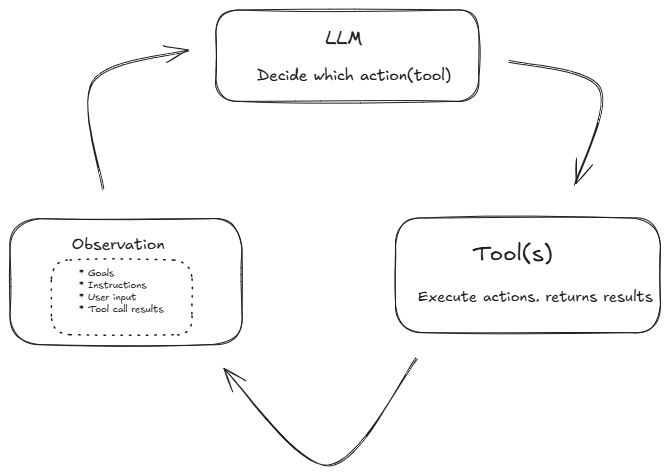
An agent is a system that:
- Observes its environment
- Thinks based on goals and context
- Acts in that environment
In other words:
Agent = Observe -> Think -> Act
Agent loop:
Agent Building Blocks
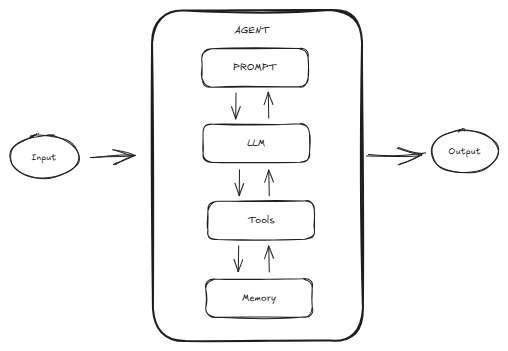
Now that we have seen the Agent Loop - Observe -> Think -> Act let’s take a look at the core building blocks that make this work in practice. We’ll explore each of these in more detail later in the series, but here is a simple overview to get started:
- Prompt: - This is how we communicate the goal and situation to the agent. It includes goals, instruction and context to help the agent reason effectively.
- LLM: The brain of the agent. It processes the prompt and context, reasons through the situation, and decides what to do next by producing natural language outputs or structured actions.
- Tools: Tools allow the agent to go beyond text; to fetch data, run code, search the web, send emails, or interact with APIs. Tool use connects LLM reasoning to real world action.
- Memory: Memory lets the agent recall instructions, past experiences, conversations or actions, so that it can act more consistently and intelligently over time.
These four building blocks work together inside the agent loop. The prompt tells the LLM what to do, the LLM decides an action, tools let it perform that action, and memory helps it learn and adapt from experience.
Agent building blocks:
The Code Reviewer Assistant
Imagine you have hired an assistant to help review code
- You show them a piece of code and an instruction(observation)
- They think about it and and form their opinion of the code (thought)
- They reply with a comment (action)
So how does an AI Agent Observe, then Think and Act.
Implementing the Agent
Let’s see how this works by creating a simple code review agent class. The agent:
- Receives a code snippet (observe)
- Uses an LLM to review the code snippet and return its review (think)
- Prints out its review (act)
import openai

class CodeReviewAgent:
    def __init__(self, llm_model="gpt-4o-mini"):
        self.model = llm_model

    def observe(self, code_snippet: str):
        return code_snippet.strip()

    def think(self, observation: str):
        """Agent uses an LLM to reason about what to do"""
        prompt = f"""
        You are a helpful code review assistant.
        Analyze the following Python code and suggest one improvement or hughlight on potential issue

        Code:
        {observation}
        """

        response = openai.responses.create(model=self.model,
                                           input=[{"role": "user","content": prompt}])

        thought = response.output_text

        return thought

    def act(self, thought: str):
        """Agent takes an action - here, it's returning a suggesting"""
        print (f"Action:  {thought}")
Below we run the review agent
agent = CodeReviewAgent()

code_snippet = """
def divide(a,b):
    return a/b
"""

goal_complete = False

while not goal_complete:
    # Step 1: Observe
    observation = agent.observe(code_snippet=code_snippet)
    print(f"\nOBSERVATION: {observation}")

    # Step 2: Think
    thought = agent.think(observation=observation)
    print(f"\nTHOUGHT: {thought}")

    #Step 3: Act
    action = agent.act(thought)
    goal_complete = True
In the introduction we mentioned that an agent executes tools in a loop until a task is done. In our first example above we can think of our agent as having just one loop because it has a simple task and one tool action print() after which the task is complete.
In later parts of the series we will see how to implement multiple loops with multiple tools
Full Source Code Here: Agent Loop Jupyter Notebook
What’s next
In the next part of the series shall see how to define tools and configure the code review agent to make decisions about which tool to use.